Explorer
Connection groups, health badges, schema drift detection, ER diagrams, guarded SQL browse, CSV import, and live data inspection.
Synrows is a local-first database workspace. Design ER diagrams, manage connection groups, seed realistic datasets for dev and QA, monitor with guarded SQL views, and publish printable reports — with Faker, local LLM, BYOK, or optional Synrows Cloud AI.
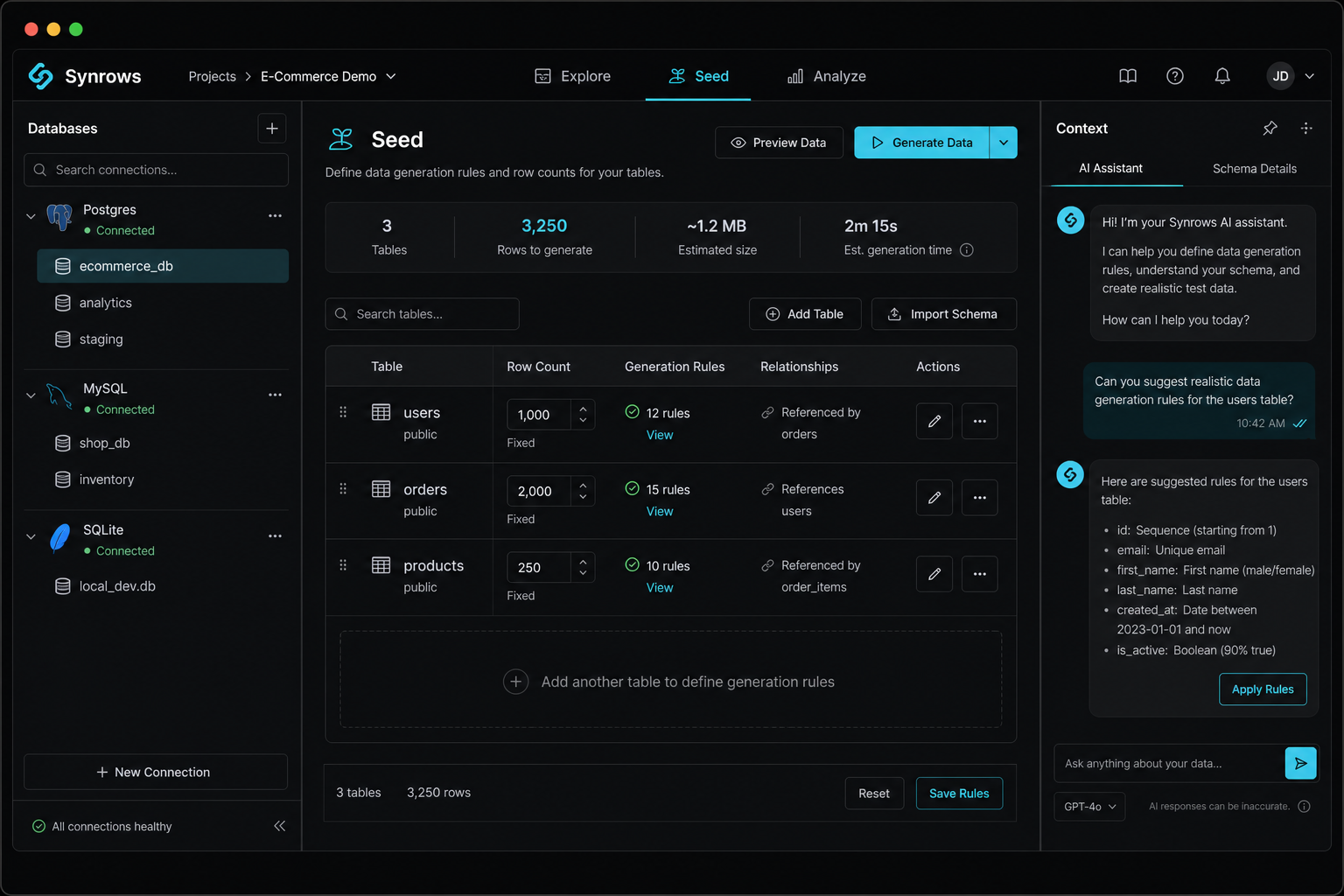
One app for schema exploration, data generation, and analytics — not just seeding.
Connection groups, health badges, schema drift detection, ER diagrams, guarded SQL browse, CSV import, and live data inspection.
Seed tasks with versioned rules, Faker heuristics, local LLM or cloud AI column rules, preview-before-apply, and cache mode.
Monitor views (table, metric, chart, list), printable report layouts, SQL guardrails, and AI-assisted metrics and narrative blocks.
SQLite, Postgres, MySQL, MariaDB, CockroachDB, Turso, MongoDB, Supabase, D1, SQL Server, Oracle, Db2, and read-only warehouses.
Lazy connect with pooling, per-connection query scheduling, health pings, and read-only enforcement for warehouse adapters.
Synrows Cloud is multi-pass hosted AI on schema metadata only. BYOK is your own key, single-shot. Or run fully offline with a local LLM — three separate choices.
From empty project to explored, seeded, and reported database in minutes.
14-day full-desktop trial. One-time Desktop license. Cloud is an optional add-on — or save with the bundle.
$0 · 14 days · one trial per machine · 200 cloud AI requests in trial (max 50/day) · no credit card
$99$119
one-time · 2 devices · 1 year updates
$12
/ month · or $108/year
| Feature | Trial | Desktop |
|---|---|---|
| Desktop | ||
| All workspace modes | ✓ | ✓ |
| All database adapters | ✓ | ✓ |
| Faker generation | ✓ | ✓ |
| Local LLM | ✓ | ✓ |
| BYOK (OpenAI / Anthropic) | ✓ | ✓ |
| Perpetual desktop license | 14 days | ✓ |
| 2 devices · 1 year updates | — | ✓ |
| Cloud add-on | ||
| Trial cloud AI quota | 200 total | ✓ + add-on 1,000/mo |
| Hosted Synrows Cloud AI | Preview | ✓ + add-on |
| Monthly AI quota (1,000/mo) | Preview | ✓ + add-on |
| Schema & rules AI | Preview | ✓ + add-on |
| SQL & report AI | Preview | ✓ + add-on |
Preview = trial Cloud AI quota included · + add-on = purchase Cloud separately or via bundle
Online checkout is not configured yet. Email [email protected] or use the request form below.
Configure site/checkout-prices.js with your Paddle client token and price IDs, or set worker checkout URL secrets.
Purchases are processed by Paddle as Merchant of Record. One trial per machine (server-enforced). 14-day money-back on Desktop, bundle, and first Cloud payment.
After purchase: activate via license key, email OTP, or
synrows://activate?key=SYNR-… deep link. Link Cloud in Settings with your checkout email.
If Paddle checkout is unavailable, leave your email and we will send instructions.
Signed installers with bundled Node runtime — no separate Node install required.
Windows and Linux installers are not in this release yet — macOS Apple Silicon and Intel are available now.
Loading release info…
One workspace for design, seeding, monitoring, and reporting — vs general-purpose SQL clients.
| Capability | Synrows | DBeaver | DataGrip | Beekeeper | TablePlus |
|---|---|---|---|---|---|
| Pricing model | 14-day trial · Desktop $99 | Free Community | ~$99/yr subscription | Free + paid tiers | Free + ~$99/yr |
| Test data seeding | Built-in tasks & rules | Manual / scripts | Manual / scripts | No | No |
| Monitor views & reports | SQL views + printable layouts | Charts only | Charts only | No | Limited |
| ER / schema design | ER workspace + drift | Diagrams | Diagrams | No | Basic |
| AI assistance | Cloud, BYOK, or local LLM | No | JetBrains AI | Optional AI | No |
| Local-first / offline | Full desktop, bundled runtime | Desktop app | Desktop app | Desktop app | Desktop app |
No. Synrows is a full database workspace: design schemas and manage connections in Explore, seed datasets for dev and QA in Seed, and monitor plus report in Analyze. Data generation is one capability—not the whole product.
SQLite, Postgres, MySQL, MariaDB, CockroachDB, Turso, MongoDB, Supabase, Cloudflare D1, SQL Server, Oracle, Db2, and read-only warehouse adapters (Redshift, Synapse, Snowflake, BigQuery).
Download a model from the in-app catalog (powered by Hugging Face Transformers). Generation runs on your machine — no data leaves your device unless you opt into cloud AI.
After trial, yes — with limits. SQLite and demo adapters only for new connections; other databases are read-only browse. Local LLM and BYOK still work. Hosted Synrows Cloud AI requires Cloud.
One-time purchase activates on up to 2 devices. Includes 1 year of updates. Activate with your
license key, email OTP from purchase page, or a
synrows://activate link from your receipt.
One 14-day trial per machine (keychain + server registry). Full desktop features during trial with 200 hosted cloud AI requests total (max 50/day). Reinstalling or resetting local data does not start a new trial.
Synrows registers your device on first launch and issues a JWT entitlement token. Trial includes 200 cloud AI requests; Cloud Pro includes 1,000/month. Cloud AI is a multi-pass pipeline that sees schema metadata only (table/column names, types, FKs) — not row data. BYOK is a separate single-shot path with your own API key and does not require Cloud.
Cancel anytime from the Paddle customer portal linked in your receipt email, or contact [email protected]. Cancellation stops future charges at the end of the current billing period.
The desktop app checks updates.synrows.app for signed releases and can auto-update from
the in-app updater. Download links on this page always point to the latest stable build.
No. Packaged builds include a bundled Node sidecar for the local server.
Yes. Explorer, Seed with Faker, and local LLM generation work offline. Cloud AI, device registration, and BYOK require network access.
Without a Desktop license, Synrows continues with SQLite and demo adapters for new connections. Existing connections become read-only for browsing. Export always works. Purchase a Desktop license to restore full access.
No. Cloud is optional hosted AI. Desktop includes Faker, local LLM, and BYOK. Cloud adds a higher daily quota for Synrows Cloud AI without managing API keys. Buy together in the Desktop + Cloud bundle to save $28.
Yes. The Desktop + Cloud bundle ($179, save $28) includes a Desktop license and Cloud yearly in one checkout. Cloud is also sold separately — it does not require Desktop, and Desktop does not include Cloud unless you buy the bundle or add Cloud later.
The 14-day product trial is free — not a charge. Paid purchases (Desktop, bundle, or first Cloud payment) include a 14-day money-back guarantee via Paddle (receipt / customer portal). See our Refund Policy.
Redshift, Snowflake, BigQuery, and Azure Synapse adapters are read-only in Synrows — ideal for monitoring and reporting. Writable adapters can also be marked read-only per connection.
Oracle and IBM Db2 are supported but require native client libraries (Instant Client / CLIDriver) installed on your machine. They are not bundled with the Synrows installer.
Report a bug, request a feature, or tell us how Synrows fits your workflow.